


Closing an online casino account is a personal decision, whether you are taking a break, moving to another service or no longer want your details held by a particular operator. If you are considering deleting your Loki Casino account from the United Kingdom, first check the available account controls and contact the casino through its official support channels. The precise process can depend on the site’s current terms, verification requirements and the status of any pending balance or withdrawal.
This guide explains how to prepare, request closure and follow up. It also distinguishes permanent account deletion from a temporary break or self-exclusion. These options are not necessarily interchangeable, so make your request clear and keep a record of the casino’s response.
Before you ask Loki Casino to close your account
Take a moment to check whether you have a balance, an unfinished withdrawal, an active bonus or a pending verification request. Closing access before resolving these matters could make follow-up more difficult. Review the current terms and conditions, particularly any sections on withdrawals, dormant accounts, data retention and account closure.
- Check your balance: If funds remain, ask support how to withdraw them before closure. Use a payment method in your own name and follow the casino’s stated verification process.
- Review pending activity: Note unsettled bets, bonus wagering requirements, pending deposits or withdrawals, and open support cases.
- Save relevant records: Keep copies of transaction confirmations, account statements and important messages. Avoid storing passwords or sensitive payment details in an unsecured file.
- Confirm the correct site: Use the official Loki Casino website or a support contact listed there. Do not rely on unsolicited messages or links from unknown sources.
If you are closing the account because gambling is becoming difficult to control, you do not need to wait until every administrative detail is resolved to ask for help. Request an immediate restriction or self-exclusion and contact an appropriate support organisation. Account deletion is not a substitute for a gambling-blocking tool or professional support.
How to delete your Loki Casino account
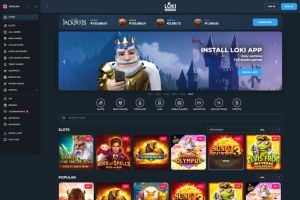
Step 1: Sign in only if it feels safe to do so
If you can access the account comfortably, sign in through the official site and look for settings related to account status, responsible gambling or security. Some casinos provide a direct closure control; others require a written request to customer support. If signing in might encourage you to gamble, skip this step and contact support through an official channel instead.
Step 2: Contact customer support
Use the contact method currently shown on Loki Casino’s website, such as live chat or email. Explain that you are a UK player and want the account closed. Be specific about whether you want a permanent closure, a temporary cooling-off period or self-exclusion. If you are unsure whether deletion is available, ask the operator to explain the options and their consequences.
Do not send your password, full card number or security code. The operator may ask for information to confirm that you own the account, but provide documents only through a secure, official process and only when requested.
Step 3: Ask what happens to your balance and personal data
Request written confirmation of how any remaining funds will be handled and whether you need to complete a withdrawal before closure. You can also ask what personal information the operator will retain, why it must be retained and for how long. A request to close an account does not necessarily mean every associated record can be erased immediately: operators may have legal, regulatory, fraud-prevention or financial-record obligations. The casino should direct you to its privacy policy or explain how to submit a data-protection request.
Step 4: Confirm the closure and keep the response
Ask support to confirm when the account has been closed and whether you will still be able to access transaction history or contact support about an outstanding issue. Save the confirmation and note the date of your request. If the casino says it needs more information, ask exactly what is required and how to submit it securely.
Step 5: Check that you cannot log in or receive marketing
Once the closure is confirmed, do not try to bypass any restriction by opening another account. If promotional messages continue, use the unsubscribe option and contact support if necessary. Keep in mind that marketing preferences and account status may be handled separately, so you may need to request both account closure and removal from promotional communications.
Copy-and-send account closure message
You can adapt the following message. Use the email address registered to the account if you still have access to it, but do not include your password or complete payment-card details.
Subject: Request to close my Loki Casino account
Hello,
I am the account holder and would like to request closure of my Loki Casino account. Please confirm whether this will be a permanent closure, and tell me if you need any information to verify my identity. Please also explain how any remaining balance or pending withdrawals will be handled.
Please confirm what account and transaction information will be retained, the reason for retention and the relevant retention period. I would also like promotional communications to stop.
My registered account email is: [your email address].
Please confirm when the closure has been completed. Thank you.
Closure, cooling-off and self-exclusion: what is the difference?
Account closure generally means you are asking the operator to disable or end your account. Whether you can reopen it later depends on the operator’s rules and the type of restriction recorded.
A cooling-off period is a temporary break. It may prevent access for a specified period, after which the account might become available again under the casino’s process. Check the duration and whether it can be extended before choosing this option.
Self-exclusion is intended for people who want to prevent themselves from gambling with an operator for a longer, defined period or on an ongoing basis. Ask support to explain the available self-exclusion arrangements and how they apply to the account. If you are in the UK, you can also look into GAMSTOP, which allows eligible consumers to self-exclude from online gambling businesses licensed in Great Britain. Check its official information to understand coverage and registration requirements.
If gambling is affecting your wellbeing, finances or relationships, consider speaking with a trusted person and contacting a specialist service such as GamCare. If you feel at immediate risk, seek urgent help from local emergency or health services.
Common questions from UK players
Can I delete my account without contacting support?
Possibly, if the current Loki Casino site provides an account-closure control. If you cannot find one, or the option is unclear, contact official support and ask for the correct procedure. Do not assume that logging out or uninstalling an app closes an account.
Will I lose money left in the account?
Do not assume that a closure request automatically transfers or forfeits a balance. Ask support how to withdraw eligible funds and whether any verification or transaction limits apply. Get the answer in writing before the account is closed where possible.
Can I ask for my personal information to be erased?
You can ask the operator about its data-protection process, but account closure and erasure are separate requests. Some records may need to be kept for legal or regulatory reasons. Ask the casino to explain which information it can erase and which it must retain, along with the relevant basis and timeframe.
What if support does not respond?
Check the site’s official help pages for an alternative contact route and make one clear follow-up that includes the date of your original request. Keep copies of your messages and any case reference. If your concern is unresolved, review the operator’s complaints procedure and the information provided about its licensing and dispute-resolution arrangements. Use only the regulator or approved dispute body relevant to the operator’s licence; do not assume that every casino has the same route.
Options if you are comparing other casinos
If you are closing Loki Casino because you want a different service, take time to check the basics rather than choosing on an offer alone. Verify that a casino is legally available to you in the UK and review its licence details through the relevant official source. Read the withdrawal rules, identity checks, complaint process, privacy policy and responsible-gambling tools before depositing. Promotions should be judged by their full terms, including wagering requirements, game restrictions and time limits.
Searches for feature buy alternatives at regulated casinos may return games and operators with very different rules. A feature-buy option is a game mechanic, not a guarantee of better value or a safer outcome. Before playing, check whether the mechanic is available in your location, what it costs, and whether the game’s stated return-to-player information applies to that feature. Set a spending limit and never treat a bonus, feature purchase or previous win as a reliable way to recover losses.
Final checklist
- Resolve or ask about any balance, withdrawal or pending transaction.
- Use contact details from the official Loki Casino website.
- State clearly whether you want closure, a break or self-exclusion.
- Ask how your data will be handled and what records must be retained.
- Keep the request, case reference and written confirmation.
- If gambling is causing harm, prioritise self-exclusion and specialist support over routine account administration.
The safest approach is to make a clear request, confirm the operator’s process in writing and avoid sharing sensitive information through unofficial channels. Because account procedures and terms can change, check the current Loki Casino website and policies before taking action.
